¶ Recommended Controls Scheme
The ability to decouple your flight vector from your attack vector is paramount. A commonly used AX tactic requires maintaining a heat signature below 20% and a high angular velocity relative to the interceptor. This results in dramatically diminished aim of the interceptor’s main cannon. Without FA-off, it is nearly impossible to keep the interceptor in your weapon’s field of fire while maintaining a flight path that does not bring you dangerously close to the interceptor, or kill your angular velocity to the interceptor.
Keyboard and mouse provides superior precision to Analogue. This is well known amongst the PVP community, and the same holds true for Thargoid hunting. Although KBM is typically the most precise input form, you may find a different setup is more suited to yourself, find what works for you, experiment!
For those new to anti-xeno or combat in general, there are a number of binds which are necessary for Thargoid combat that may not be easily accessible or bound at all without doing it manually. These binds will be used regularly and should be comfortable to reach from a neutral hand position over thrust controls and without messing with your aim during combat!
On top of the thruster binds you will need:
- Relative Mouse toggle (when using KBM)
- Flight Assist toggle
- Cycle next fire group and/or Cycle previous fire group (only one is necessary but both is nice)
- Deploy heatsink (see firegroup information below for bind limited input methods)
- Silent running
- All pip management binds
- Boost
- Select Target ahead
- Shutdown field neutralizer (for builds that include it)
¶ Input Settings
Recommended Ship Control Options and Input Setups for Mouse, Stick (main-hand) and Controller.
The following are recommended mouse settings which enable relative mouse control (the cursor returns to the center of the reticule without player input). This dramatically increases your aim, because it makes it easier to make small adjustments in FA-off.
Rebind Yaw to mouse X axis and Roll to Q & E for QWERTY keyboards or A & D for AZERTY keyboards.** Ensure that flight assist is set to toggle.
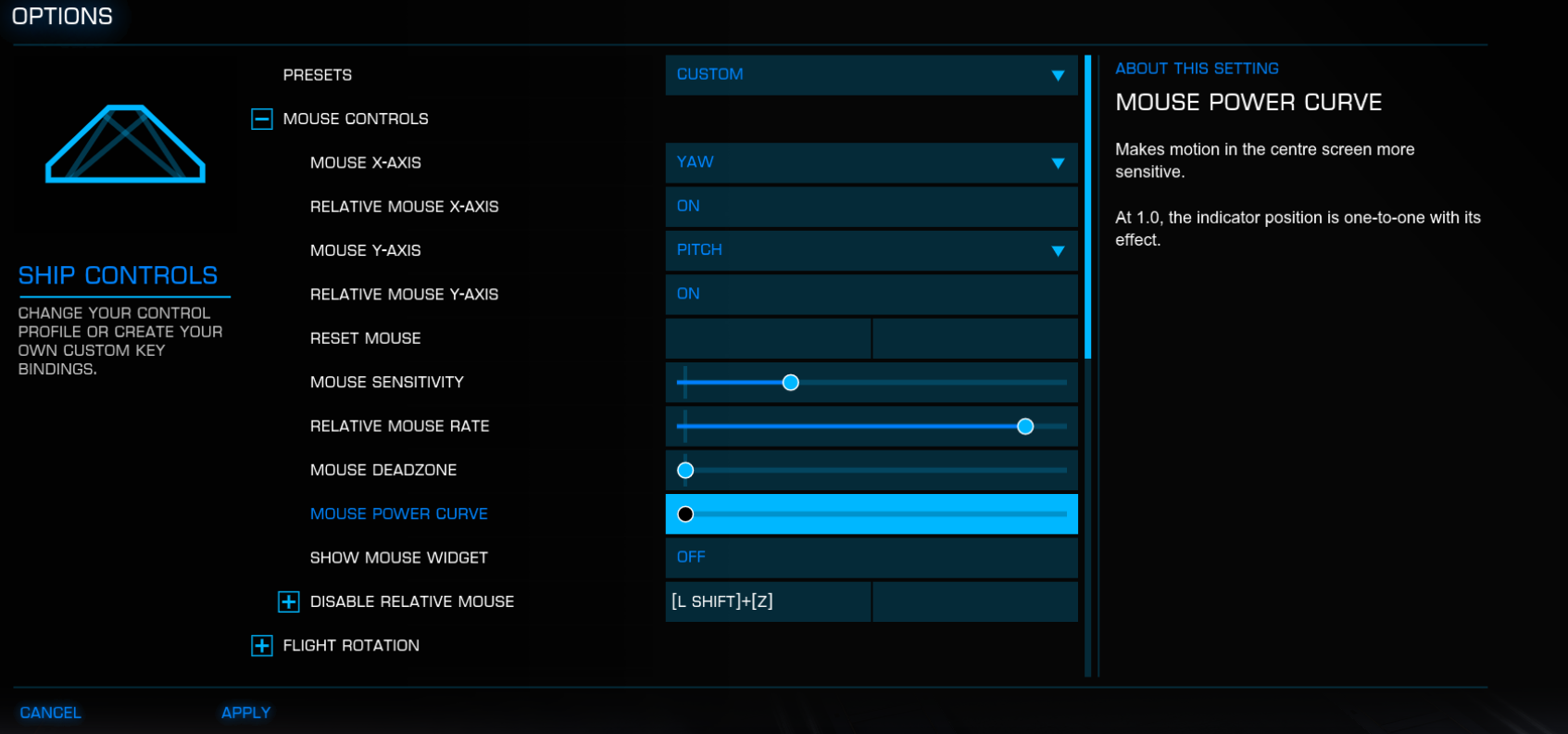
Maneuvering in supercruise with relative mouse enabled is tedious. There are two main solutions this. The above image shows a disable relative mouse, which can be made a toggle or hold down. The second option is to bind pitch yaw and roll somewhere else on your inputs, like a number pad.
Optimal stick settings are more individual than mouse settings. The exact model of the stick, ergonomics, personal preference and what other input device(s) make up your setup are all factors.
¶ On-Stick-bindings
Easy to reach binds are even more important with sticks than with mouse. Any finger-movement or hand-adjustment to reach a button or hat will skew with your stick movement and therefore aim & flying.
Make sure any binds you need during combat are well placed and easily accessible!
¶ Deadzones
Precision gameplay requires precision controls. Deadzones should be avoided! They limit your range of fine-tuned inputs. If your Stick fails you in this regard, with issues like ghost-inputs; the efforts of either repairing / modifying the stick or even switching to other input-devices are often preferable to working with a sub-par stick with deadzones.
¶ Springs & Clams
Some Sticks/Bases come with a selection of springs and clams to choose from.
This is once again a very personal choice that will depend on preference, as is often the case with analogue input.
When used for space-sim games such as Elite, with Flight-Assist off and mostly fixed weapons in mind, the broad default recommendations are:
- Soft-Center to Medium-Center Cams
For Space-sim flight (especially with FA off and aiming in mind) we do not require much centering effect nor bump. Smoother cross-axes motion and fine-tune range in the center is preferable. - Medium-strength Springs
Do not use springs that are too weak, especially when already using a softer clam for smoothness. Let the spring give you some feedback on your motion.
But consider that the Stick will sometimes be held in a certain position for extended periods of time, or need to be switched across sides in an instant. Very strong spring resistance may lead to fatigue after a while.
A spring in the medium ranges is often prefered.
¶ Response/Power Curves
Many players find it difficult to precisely control their ship with linear input by default. Even more so with the very fine-tune back and forth adjustments that are required to fly & aim steadily during Flight-Assist Off flying.
A lot of practice can let players adjust to that, but another good option, to make this easier, are response curves. The goal with response curves, in this case, is to soften the initial input rate of the axes’ center on your stick. This will make the small fine-tune inputs required for precise FA Off flying easier, while still allowing for high rate input further along the outer part of the axis.
Elite Dangerous does not have an option for response curves, so you will need other software. Some sticks will have their own software from the manufacturer, but this will not always be the case and sometimes these softwares can be lackluster.
Our recommended third party alternative is the open-source software Joystick Gremlin, together with vJoy.
- Setup vJoy. Your device inputs will be mapped to virtual device inputs.
- Setup Joystick Gremlin. Select the vJoy virtual inputs and make response curves for the virtual axes you want to modify.
- Bind the newly setup virtual axes-inputs inside your Elite Dangerous settings. Use the Input Repeater option within Joystick Gremlin and let Elite detect the virtual inputs repeated after your analogue inputs seperately, during the re-binding process. After binding the virtual axis in-game you can turn off the Input Repeater.
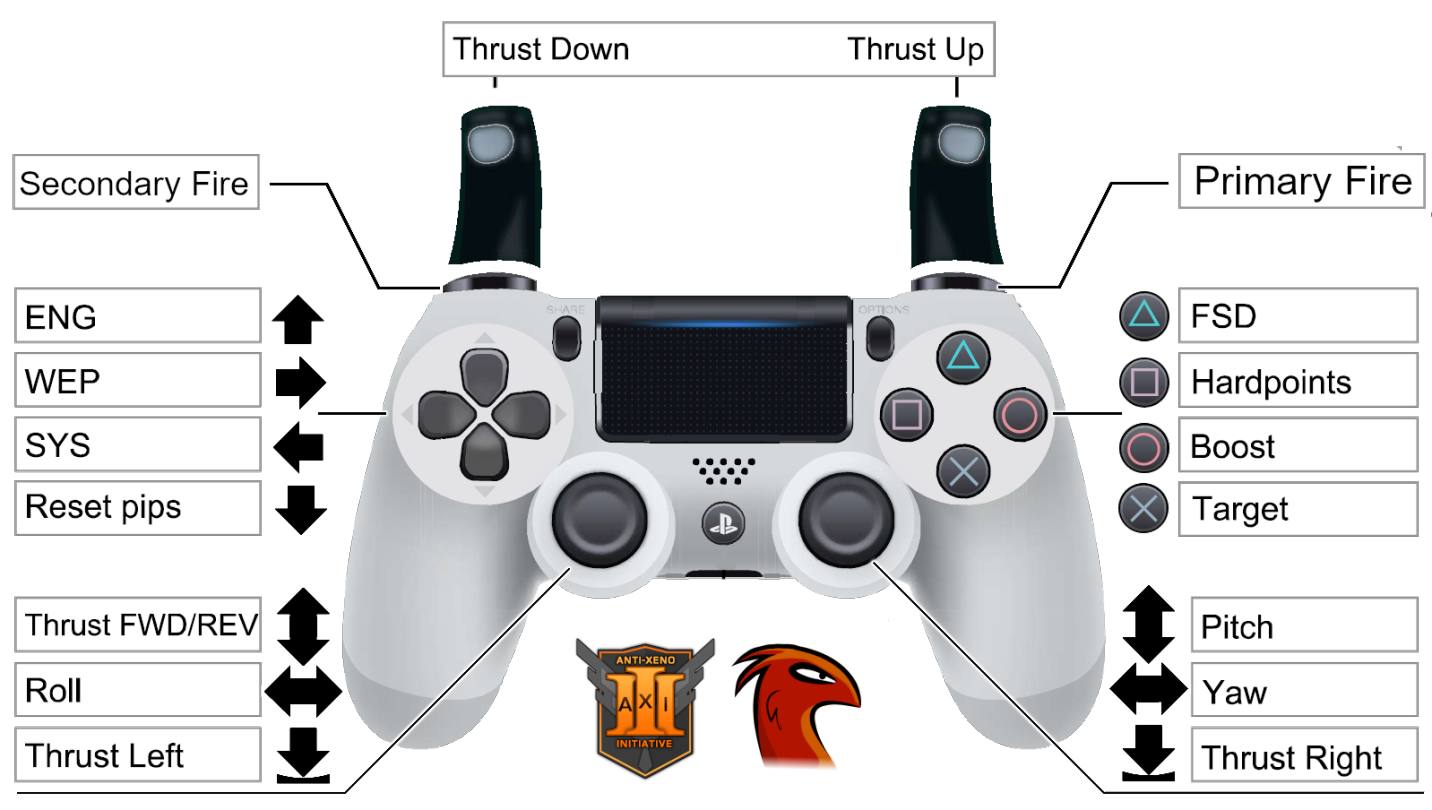
These Controller Settings were made with the intent to emulate axes from shooter games to make it intuitive, and controls were remapped from scratch specifically for cold orbiting.
- All the aim on one stick, and forward/back movement on the other.
- Roll is important to give an analogue axis to, so it gets put in the last available axis on the sticks.
- Up/down thrust gets very heavy use and needs to be put somewhere that is comfortable to hold while still being able to use both analogue sticks; That’s the shoulder buttons.
- Lateral thrusters are kind of an odd one out, not needed for AX, but still useful for landing etc. The only available place remaining is clicking the analogue stick anyway.
¶ Fire Groups & Binds
The other main leg of ship setup involves fire groups, night vision, and lights. Night vision and ship lights come down to personal preference, but in many combat areas the lighting will be poor and limit overall visibility. It is recommended that at least night vision is turned on to combat this poor lighting, and increase the thargoid heart visibility. This is done by opening up the right hand ship panel (default for this on keyboard is 4 on the number row). It will be inside the SHIP tab and is a simple toggle. Ship lights are in the same tab, and help some but are not necessary.
Fire groups are more complex, and there are a number of things to consider in how they are setup.
- Heat Management
- Input Method
- Ease of Use
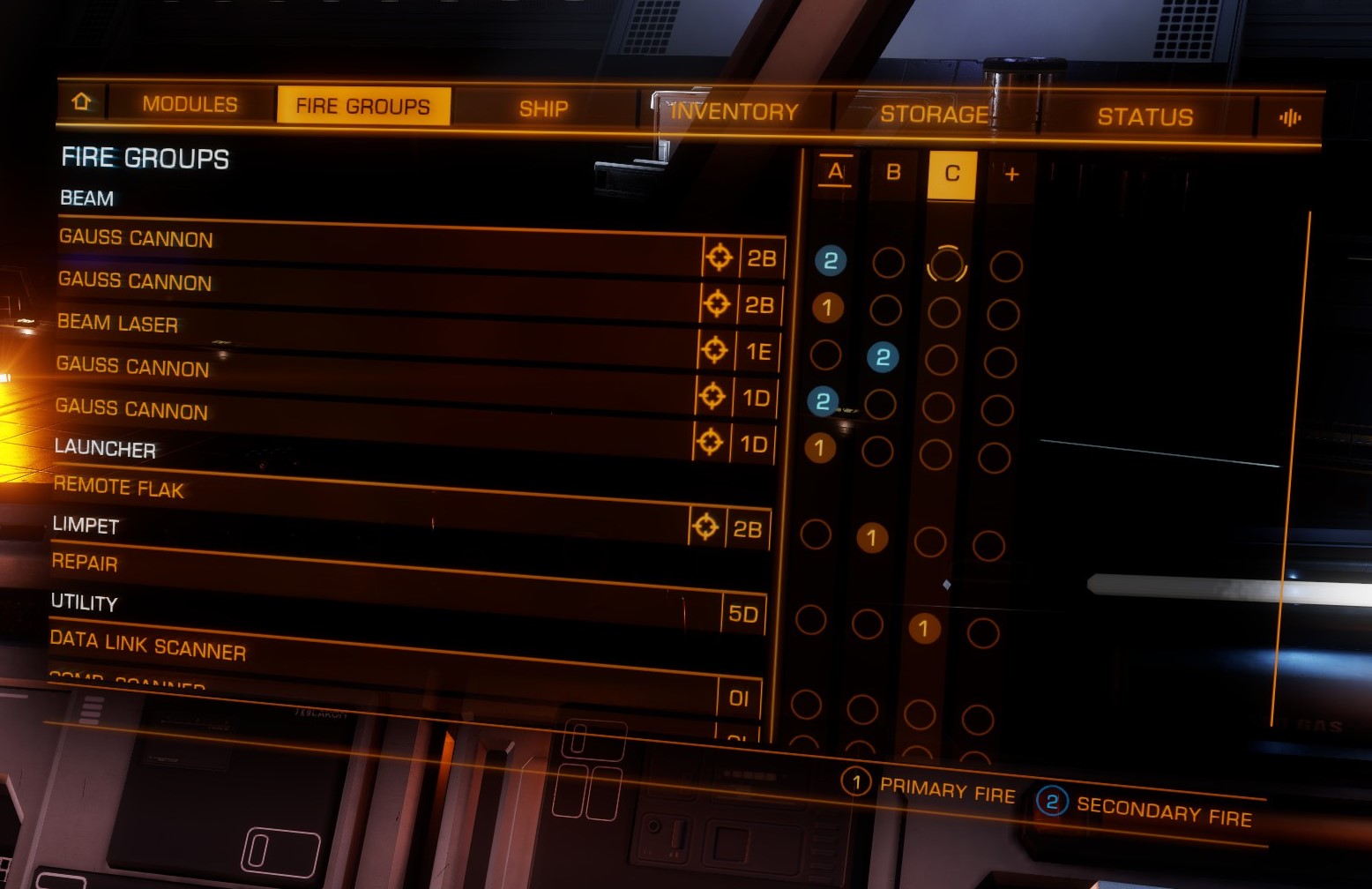
First, controlling the heat output of the very power hungry and hot running guardian weapons is the main concern. This gives us the ability to better stay under 20% heat and avoid being locked onto by the interceptor. For guardian gauss cannons and modified guardian shards, you should only be firing half of your weapons at a time, alternating to utilize all of your weapons, and take advantage of reloads to keep dps high. This both gives your power distributor time to recharge, and keeps the heat per volley down. Important to remember is to split any different size weapons equally onto primary and secondary in any given firegroup. This is to make sure you don’t fire 2 medium gauss, and then 2 small gauss, which will make your heat spike on the former much higher.
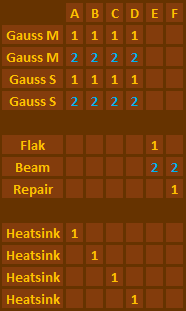
Secondary to heat management and directly related to input method, is how your heatsinks are used. Ideally a separate bind would be used to give the most flexibility for when and where to use them but controller, and some hotas setups are limited in the number of inputs easily available. In this situation you can set up your fire groups such that each one has a different sink that will be used as you fire, and cycle through them as you empty heatsink launchers.
Lastly to consider is ease of use. Your guardian weapons will be separate fire groups from your utility, but how you mix and match your utility depends on your specific loadout. In a full build with flak, repairs, and thermal vent beams, the general guidance is to place repair limpets and your beams, on primary and secondary of the same group, and have flak and beam on a separate group. This allows you to keep your ship cool without sinks any time you are in beam range of the thargoid, and separates flak and repairs, since you are more likely to be hit while killing the swarm.
Example of standard KBM or HOTAS / HOSAS firegroups, which leave heatsinks to their own bind. (Remember to bind a hotkey for Heatsinks in Settings.)
Example of limited input firegroup to allow easy use of heatsinks via firegroups rather than hotkeys. (For example if your input device or setup does not allow for the use of more hotkey binds.)
¶ Keybinds Backup
The AXI strongly recommends backing up controls. Elite will sometimes reset controls when inputs are changed or the game is updated and this is the best way to avoid losing all of your personal binds.
This can be done by finding your bindings folder, and making a duplicate of that, to be used as a replacement if an update breaks the orignals.
The default file path for a steam installation will be [C:\Users\USER\AppData\Local\Frontier Developments\Elite Dangerous\Options\Bindings]. Best practice will be to save the entire bindings folder as a replacement, but making a personal bindings file and backing just that up is also a good option.
¶ Reference Keybinds (Odyssey only! These will not work with Legacy)
These are “reference” (mouse and keyboard only) binds which can be used as the basis to edit and add additional devices. They should always load, and work well out-of-the-box:
mechan_mkb_v6.4.2.binds
This is a Joystick Gremlin configuration file for Winwing Ursa Minor HOSAS dual sticks (right handed), and the in-game binds file. It adds curves, pip macros, and a heatsink macro.
mechan_winwing_hosas_v6.4.2.xml
mechan_winwing_hosas_v6.4.2.binds
Note: These will only work when configured through vJoy/Hidhide/Gremlin - they will NOT work with “native” Joysticks (without using vJoy)!